Pixelate Image Online - Fast & Free
Transform any photo into pixel art instantly with our browser-based pixelate image tool. No uploads, no registration, complete privacy.
The Most Secure Way to Pixelate Image Files
Looking to pixelate image files quickly and securely without uploading to third-party servers? Our Pixelate Image Tool offers a powerful, browser-based solution with full privacy and zero hassle. Everything happens directly in your browser—nothing is uploaded, nothing is saved. Just select your photo, customize your pixelation settings, and download. Simple as that. Whether you need to pixelate image content for privacy protection, create retro pixel art, or add creative effects to your photos, our tool gives you complete control without compromising your data security.
Key Features of Our Free Pixelate Image Tool
This isn't just any picture pixelator—we give you professional-grade control and creativity when you pixelate image files
Change Color Palettes
Swap colors in your image or design your own custom palette for unique artistic effects.
Create Custom Color Palettes
Tailor the exact colors used in your pixelated image for brand consistency or creative expression.
Apply Grayscale Filters
Instantly turn your image black and white for a classic, clean pixelated look that's perfect for retro aesthetics.
Draw Grid Lines
Add color-separated grid lines to each block of pixels—perfect for teaching pixel art, game design, or digital painting.
Edge Borders
Highlight object edges to make shapes more defined when you pixelate image content. Control edge width for sharper contrast and better definition.
Batch Processing
Need to pixelate image files in bulk? Process multiple photos with the same settings for consistent results.
Real-time Preview
See your changes instantly as you adjust settings, making it easy to achieve the perfect pixelated effect.
How to Pixelate Image in Your Browser - 4 Easy Steps
With our photo pixelator, you can pixelate image files and turn any picture into a pixelated version in just a few clicks:
Upload Your Image
Drag and drop or select your image file from your device. All common formats supported (JPG, PNG, GIF, WebP).
Adjust Block Size
The default pixel size is 7, but you can fine-tune it from 1-50 to get the exact look you want. Smaller blocks create subtle effects, larger blocks create bold pixel art.
Customize Settings
Use advanced options like custom color palettes, grayscale filters, edge highlighting, or grid lines to make your pixelate image results truly unique.
Download Instantly
Save your pixelated photo directly to your device. No signup, no watermark, no waiting.
Why Use Our Tool to Pixelate Image Files?
Whether you're trying to pixelate image content for privacy, create pixel art, or just experiment with styles and effects, our tool is the most flexible solution available online.
🔒 100% Private
Your images never leave your browser. When you pixelate image files with our tool, everything is processed locally on your device for maximum security.
💯 Totally Free
No subscriptions, no hidden fees, no premium tiers. Full access to all features to pixelate image content without any cost.
♾️ Unlimited Use
Pixelate image files as many times as you want, with no image size limits or daily restrictions.
⚡ No Uploads, No Waiting
Everything is processed on your device for instant results. No server delays, no queue times.
🎨 Professional Quality
Advanced algorithms ensure high-quality results when you pixelate image files, with smooth edges and accurate color reproduction.
📱 Works Everywhere
Use on desktop, tablet, or mobile. Our responsive design lets you pixelate image content on any device.
Frequently Asked Questions About Pixelate Image
Everything You Need to Know About Pixelate Image
What does it mean to pixelate image files?
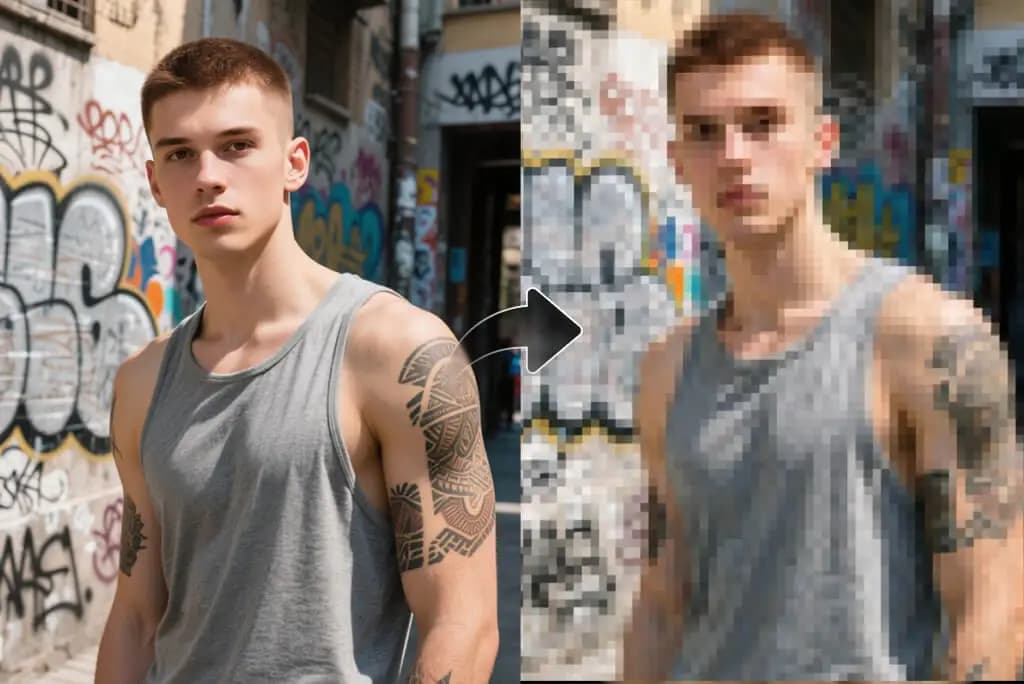
To pixelate image means to convert a high-resolution photo into a blocky, mosaic-like effect where individual pixels become visible as larger squares. This technique is commonly used for privacy protection (hiding faces or sensitive information), creating retro 8-bit art styles, or adding creative effects to photos. When you pixelate image content, the software groups neighboring pixels together into larger blocks, reducing detail while maintaining the overall composition.
Is it safe to pixelate image files online with your tool?
Absolutely! Our tool is 100% safe and private. Unlike other online services, when you pixelate image files with our tool, nothing is uploaded to any server. All processing happens directly in your browser using JavaScript, meaning your images never leave your device. This makes it the most secure way to pixelate image content, especially for sensitive photos or confidential documents.
Can I pixelate image files on mobile devices?
Yes! Our pixelate image tool works perfectly on all devices—smartphones, tablets, laptops, and desktops. The responsive design automatically adapts to your screen size, and since all processing happens in your browser, you get the same fast performance whether you're on iOS, Android, or any other platform. You can pixelate image files anywhere, anytime.
What's the best pixel size to use when I pixelate image content?
The ideal pixel size depends on your purpose. For privacy protection (hiding faces or text), we recommend larger blocks (15-30 pixels) to ensure information is completely obscured. For artistic effects or retro game aesthetics, smaller blocks (5-12 pixels) work better as they preserve more detail while still creating that classic pixelated look. Our tool lets you adjust from 1-50 pixels so you can experiment to find the perfect setting for your needs.
Can I pixelate image files in bulk or batch process multiple photos?
Yes! While you process one image at a time through the interface, you can quickly pixelate image files in succession by using the same settings. Simply process your first image, note your preferred settings (pixel size, color palette, filters), then apply those same settings to subsequent images for consistent results across your entire batch.
Will there be a watermark when I pixelate image files with your free tool?
No watermarks, ever! When you pixelate image content with our tool, you get clean, professional results with no branding, logos, or watermarks added to your photos. What you download is exactly what you see in the preview—pure pixelated art. We believe in providing a truly free service without hidden limitations or forced attribution.